
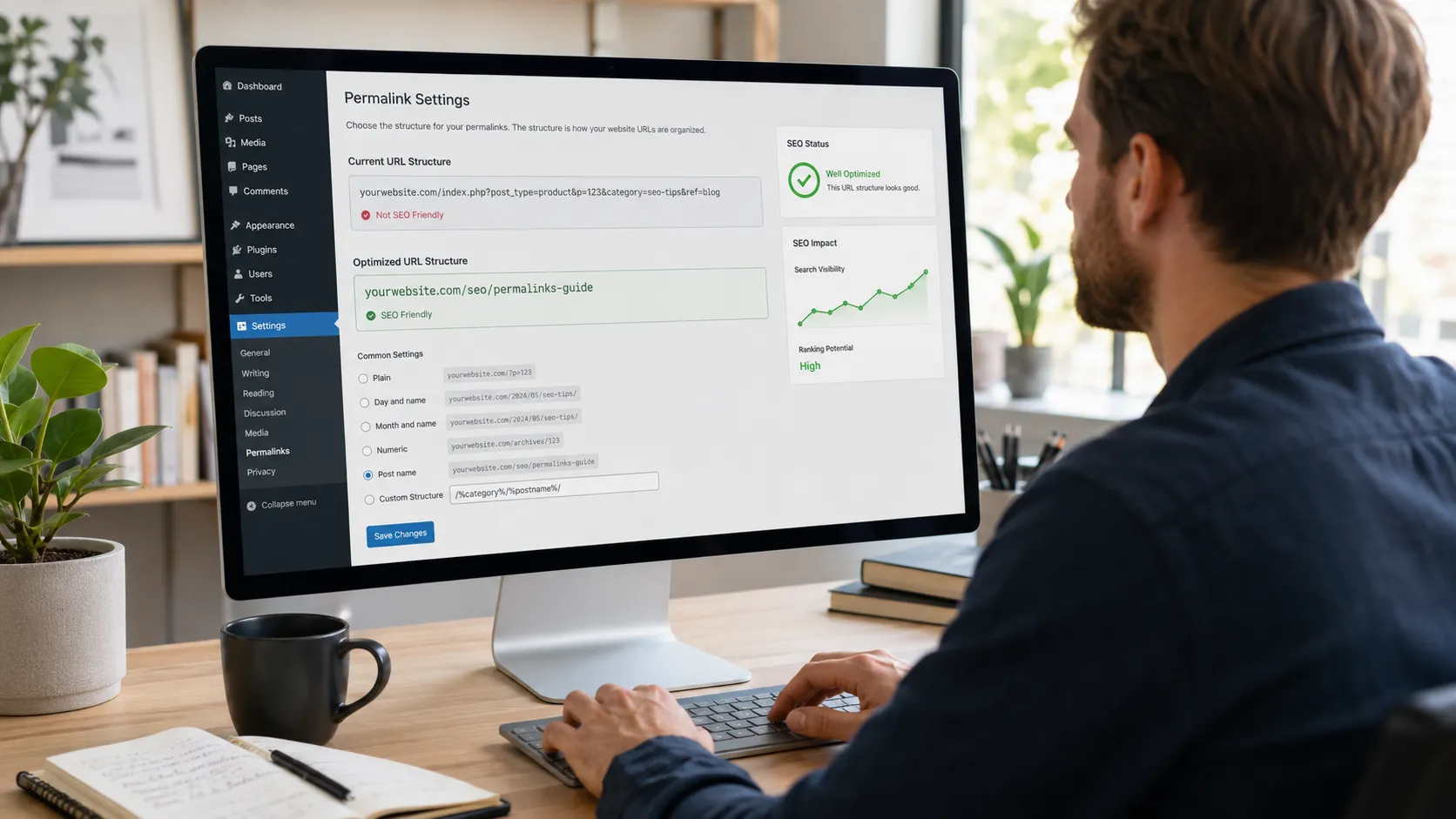
WordPress permalinks control the exact web address search engines and visitors see for every post and page. Getting them right means choosing the post name structure, keeping the slug short, cutting stop words, and folding in your target keyword before you publish. This guide covers the settings, plugins, and redirect steps that keep your rankings intact when you change an existing URL.
Key Takeaways
- The post name structure (site.com/sample-post/) is the WordPress default and the safest pick for SEO going into 2026.
- Slugs between three and five words and under 60 characters read best to visitors and search engines alike.
- Changing a live URL structure without 301 redirects can erase months of ranking progress within days.
- Removing stop words like and, the, and of trims a slug without losing clarity.
- Local service businesses gain added relevance from geo-specific slugs tied to their town pages.
Why Permalinks Matter for SEO
A permalink is the permanent web address WordPress assigns to a post, page, and custom content type alike. It plays a bigger role in SEO than most site owners realize, shaping how a search engine reads a page and how a visitor decides to click. The points below cover exactly where that impact comes from.
- Crawl and indexing clarity: a clean slug like site.com/permalink-seo-guide tells Google’s crawler the page’s topic before it even reads the content.
- Click-through rate: a URL a person can read at a glance, such as site.com/wordpress-permalinks, earns more clicks on a results page than a string of numbers.
- Keyword relevance: placing the target phrase inside the slug, for example site.com/local-seo-nj, reinforces the same signal sent by the title tag and headings.
- User trust: a tidy address like site.com/seo-pricing-guide looks more credible when shared over email and text than a link full of random characters.
- Internal link structure: a logical slug such as site.com/blog/permalinks makes it easier to build a clear site map and pass authority between related pages.
- Long-term stability: a well-planned permalink rarely needs to change later, which means the page keeps its backlinks and its rankings instead of restarting from zero.
WordPress Default Permalink Structures
WordPress includes six default permalink options inside Settings > Permalinks: Plain, Day and name, Month and name, Numeric, Post name, and Custom Structure. Most of them date back to WordPress’s early years, when URLs mimicked print archive filing. Only one still earns a recommendation from working SEO practitioners today.
| Structure | Example | SEO Fit |
|---|---|---|
| Plain | site.com/?p=123 | Poor, no readable words |
| Day and name | site.com/2026/07/25/sample-post/ | Weak, date clutter |
| Month and name | site.com/2026/07/sample-post/ | Weak, date clutter |
| Numeric | site.com/archives/123 | Poor, no context |
| Post name | site.com/sample-post/ | Strong, clean, and keyword-ready |
| Custom structure | site.com/topic/sample-post/ | Strong, adds category context |
Post name stays the standard pick for both a blog and a service page. Custom structure earns its place on larger sites that need a category segment for navigation, provided the category itself stays short and stable.
How to Optimize Your WordPress Permalinks for SEO
1. Choose the Post Name Structure First
Set the permalink structure to Post Name under Settings > Permalinks before publishing anything else on the site. This single setting builds every future URL as site.com/sample-post/, skipping the number strings and date paths WordPress falls back to by default, and it removes the need to fix each slug by hand later.
2. Keep the Focus Keyword, Cut the Rest
Match the slug to the phrase a reader would actually type into Google, then remove everything that phrase does not need. A default WordPress slug pulls the entire post title—articles and filler words included—so trimming it is a manual step on every publish. site.com/optimize-wordpress-permalinks-seo reads clean and holds the keyword; a slug carrying the full title, like site.com/how-to-optimize-your-wordpress-permalinks-for-better-seo-rankings-in-2026, does not.
3. Skip Dates for Evergreen Content
A date in the URL locks a piece of content to a moment, which works against evergreen guides that get refreshed year after year. Time-sensitive news posts and event pages are the exception, since a date there adds real context. site.com/wordpress-permalink-guide stays useful for years. site.com/2026/07/wordpress-permalink-guide reads as outdated the moment the calendar turns.
4. Remove Stop Words and Special Characters
Words like and, the, of, a, and in add length without adding meaning. site.com/permalink-guide-seo reads cleaner than site.com/the-guide-to-permalinks-and-seo, and it holds the same keyword weight. Skip underscores, ampersands, and other special characters that Google’s own guidelines flag as harder to parse.
5. Keep Slugs Short and Scannable
Three to five words, typically under 60 characters, works best on a phone screen and in a text message alike. site.com/local-seo-tips is easy to scan. A slug running twelve words long forces a reader to skim past half of it before reaching the point.
6. Avoid Keyword Stuffing in the Slug
Packing the same phrase into a slug more than once reads as spam rather than relevance. site.com/wordpress-seo-tips serves the keyword once and clearly. A slug like site.com/wordpress-seo-tips-for-wordpress-seo repeats it and signals a manipulative pattern to Google instead.
7. Use Hyphens, Not Underscores
Google reads a hyphen as a space between words and an underscore as a connector joining them into one term. site.com/permalink-optimization separates cleanly into two readable words. site.com/permalink_optimization can be misread as a single string instead.
8. Keep Category Bases Lean
A category segment can add useful context on a larger site, provided it stays short. site.com/seo/permalink-guide reads clean. A nested path like site.com/blog/category/seo-tips/permalink-guide buries the keyword under layers that add no real value instead.
Common Permalink Mistakes That Quietly Hurt Rankings
Small errors in permalink structure rarely show up right away, but they compound across a full site with dozens, sometimes hundreds, of published pages. Most of these mistakes come from convenience rather than carelessness, which makes them easy to miss during a normal publishing routine. The list below covers the patterns that quietly cost rankings over time.
- Leaving the /category/ base in the URL for every post, which adds length without adding meaning for most blogs.
- Rewriting an established, already ranking slug just to fit a new keyword idea, trading real rankings for a marginal wording gain.
- Packing the same keyword into the slug two to three times, which reads as spam rather than relevance.
- Mixing trailing slashes inconsistently across pages, creating duplicate content signals between two versions of the same address.
- Chaining redirects, where an old URL points to a second old URL before finally reaching the live page, which slows crawling and dilutes the SEO value passed along.
A quarterly audit of the URL list, checking for stray category bases, duplicate slugs, and redirect chains, catches most of these before a customer and a search engine ever notice.
Plugins for Permalink Optimization
A handful of WordPress plugins make permalink management easier, especially on a large, growing site. The options below cover the most common needs, from basic slug editing to full URL rewriting.
- Yoast SEO: flags a slug that runs too long and highlights a missing focus keyword, then shows a live snippet preview before publishing.
- Rank Math: includes similar slug analysis alongside redirect management, so a changed permalink can get a 301 redirect set up in the same screen.
- Permalink Manager Pro: edits parts of a URL WordPress locks by default, including removing product bases and category bases on a WooCommerce site.
- Redirection: a dedicated plugin for logging 404 errors and mapping old URLs to new ones after a structural change.
- SEOPress: bundles slug suggestions, redirect handling, and schema markup in one dashboard for a site managing many content types at once.
Changing Permalinks Without Losing Your Rankings
Editing a permalink structure on a live site is a bigger decision than it looks. Ahrefs found that after five years, an average of 40 percent of web pages are no longer reachable at their original address, a gap driven mostly by sites that changed URLs and skipped the redirect step. Every changed slug needs a 301 redirect pointing the old address to the new one, set up before the change goes live, not after traffic starts dropping.
The stakes climb higher for a page that already ranks and already earns leads. When we rebuilt the URL structure behind our Ridgewood SEO services page, every legacy address got a mapped 301 redirect before launch, so the page held its position through the change instead of restarting from zero.
A safe migration follows a set order:
- Export a full list of current URLs, prioritized by traffic and by the number of pages linking in.
- Set up 301 redirects from every old URL to its new counterpart using a redirection plugin, and for larger migrations, server-level rules.
- Update internal links across the site so nothing points to an old, redirected address.
- Resubmit the XML sitemap in Google Search Console once the new structure is live.
- Watch the Search Console coverage report for 404 errors over the following month and patch any that surface.
Permalinks and Local Search Visibility Across New Jersey
A geo-specific slug gives a local service page extra relevance for the area it serves. A landing page built for New Jersey homeowners does better work as site.com/seo-services/ than as a generic slug with no location signal at all, since it matches the way people actually search near their own town. Our own New Jersey SEO services page is built on that exact pattern, pairing a clean post name slug with a keyword that maps directly to search intent.
The same idea scales down to individual blog posts written for a local audience. A post titled “Small Business Marketing Tips” reads as generic to a reader and a crawler alike, and a slug like site.com/small-business-marketing-new-jersey signals exactly who the content serves. New Jersey spans dozens of small, distinct downtowns, and a site that mirrors that geography in its URLs tends to earn stronger relevance for each one, rather than competing against itself with a single flat slug meant to cover every location at once.
Leonardo da Vinci is often credited with the line, “Simplicity is the ultimate sophistication,” and a permalink is one of the few places in SEO where that idea applies without any real tradeoff. A short, readable, keyword-matched slug serves the visitor, the crawler, and the business owner sharing the link on a flyer and a business card alike, all at once.
Get Your Permalinks Right the First Time
Fixing permalinks across an entire site touches redirects, internal links, and sitemap settings at the same time, and one missed step can undo the gain from the others. H Grant Designs handles WordPress technical SEO for businesses across Bergen County and the wider New Jersey market, from slug structure through the full redirect map. If your site’s URLs have grown messy over the years, schedule a permalink audit and get a clear plan before touching a single setting.
Frequently Asked Questions
What is the best permalink structure for WordPress SEO?
The post name structure, which builds a URL from just the slug (site.com/sample-post/), is the standard recommendation. It stays short, holds the keyword, and skips date clutter that adds no value for most content.
Does changing permalinks hurt SEO?
Changing a live permalink without a 301 redirect breaks every existing link and search listing pointed at the old address. With redirects mapped correctly before the change, rankings typically carry over within a few weeks.
Should I include categories in my URL?
A category segment can add useful context on a large site with clear topic sections. Keep the category name short and stable, since changing it later triggers the same redirect work as changing the slug itself.
How long should a WordPress permalink be?
Three to five words, typically under 60 characters, works best. That length stays readable on a phone screen and still carries the target keyword.
Do stop words in URLs affect rankings?
Stop words like and, the, and of add length without adding search value, so most guides recommend stripping them. The effect on rankings is small, but the slug reads cleaner without them.
Should I use dates in my post URLs?
Dates make sense for news content and events, where the timing is part of the story. For evergreen guides, a dated URL sets an expiration date in the reader’s mind, so it works against a page meant to stay relevant.